
Your law firm's website in Lexiel: a microsite with profile, testimonials, calculators and lead capture
Publish a professional firm microsite from Lexiel, with profile, testimonials, quotes, embedded calculators and a contact form.
Many small firms have no website, or have one from years ago that nobody updates. Building a new one takes a designer, hosting and time, and the result is a business card that captures nothing.
What a client looking for a lawyer needs is little: who you are, what you specialise in, how to contact you and the chance to run an indicative calculation.
How Lexiel solves it, step by step
Lexiel includes a firm microsite that you configure from the app itself.
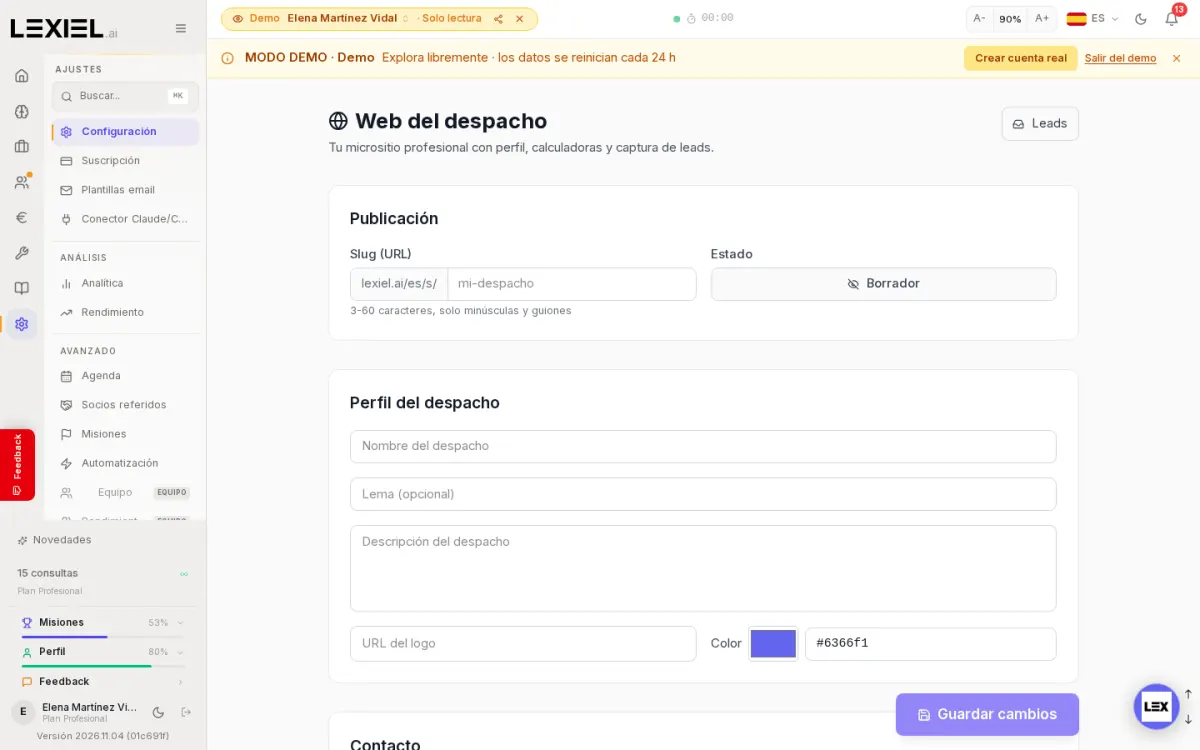
- Open Settings → Firm website.
- Under Publishing choose the address (
lexiel.ai/en/s/followed by your firm's name: 3 to 60 characters, lowercase letters and hyphens only) and the status, which starts as Draft. - Under Firm profile fill in the name, tagline, description, logo and brand colour; further down, the contact details.
- The microsite can carry testimonials, quotes and embedded calculators, and the enquiries it receives are collected under the Leads button.
- When it is ready, save the changes and move the status from Draft to published.
What it does not do
- We measured the settings, not a published website. The demo account has no website created; the screenshot shows the empty settings.
Frequently asked questions
Can I use my own domain?
What we checked is the Lexiel address (lexiel.ai/en/s/); we make no claim about custom domains.
Where do I see incoming enquiries?
Under the Leads button on the website settings screen itself.
Keep reading
- The full market analysis: legal software comparison for Spain 2026.
- legal CRM and client management
- calculators for law firms: Lovable vs Lexiel
Described with Lexiel version 2026.11.04 and the demo account, with fictional data.
Try Lexiel free · 28 days
Use code LEX-BLOG for double the standard trial period. Cancel anytime, no commitment.