
Legal calculators for lawyers: costs, deadlines, severance and compensation in one place
More than 70 AI-free legal calculators in Lexiel: court costs, court fees, severance, capital gains or income tax. What they calculate, how to use them and their limits.
One client calls to ask how much compensation they would get for dismissal, another wants to know what losing a case could cost. You do these sums several times a month, usually in a spreadsheet inherited from a colleague, with a formula nobody remembers checking since the last reform.
The risk is not that the sum is hard. It is that it is slow, that every lawyer in the firm does it their own way, and that the figure that ends up in the email to the client cannot be reproduced when someone questions it.
How Lexiel solves it, step by step
Lexiel gathers the firm's everyday calculators on one screen, inside the app and also on the public website at lexiel.ai/en/tools. They are deterministic: no AI is involved, so the same input always gives the same result.
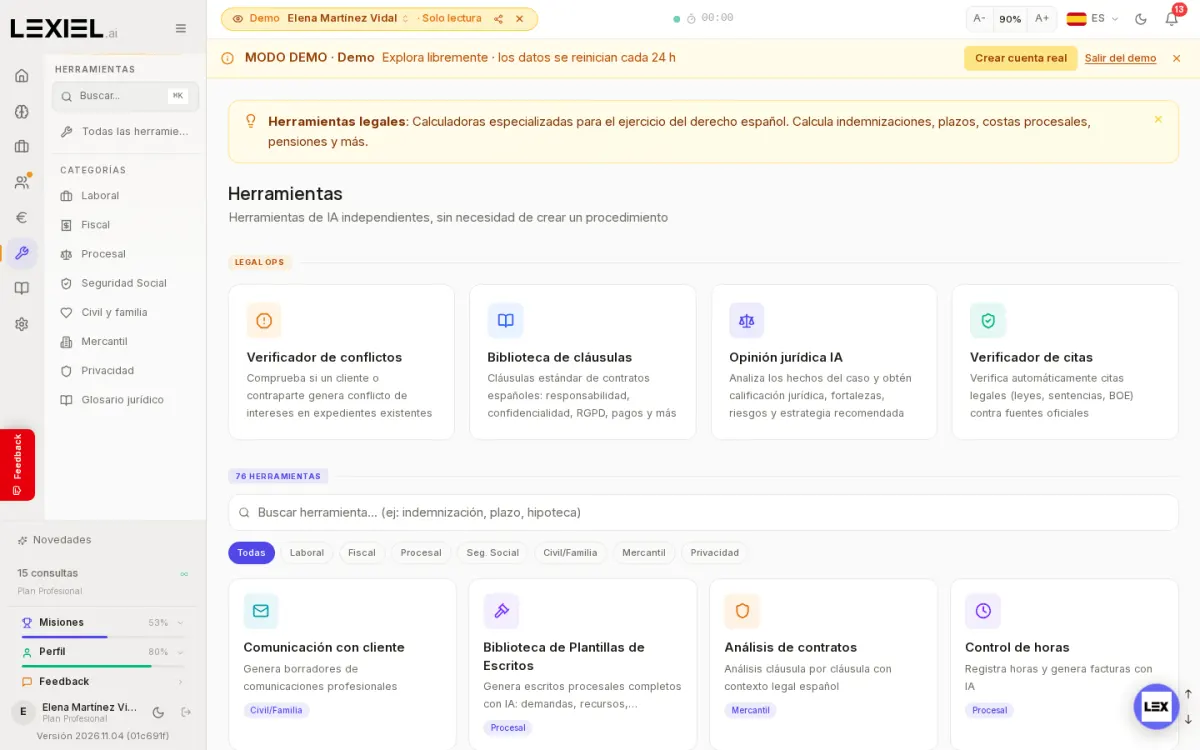
- Open Tools from the side menu of the app. Calculators are grouped by category: Employment, Tax, Procedural, Social Security, Civil and family, Commercial, Privacy.
- Filter by category or type what you need in the search box (for example "severance", "deadline" or "mortgage").
- Open the calculator, fill in the case data and read the result. Available ones include court costs, deadlines, compensation, severance, capital gains tax, income tax and court fees.
- From the "My day" screen you have quick shortcuts to the most used ones (deadlines, interest, compensation, seizure, severance and fees).
What it does not do
- It does not give a legal assessment of the case: it calculates from the data you enter, and making sure that data is right remains your responsibility.
- It does not replace reading the applicable rule: if a figure is decisive for a brief, check it against the official source.
- It does not use artificial intelligence: that makes it predictable, but it will not draft or explain the result either.
Frequently asked questions
How many calculators are there?
52 calculators specific to Spanish law. The Tools screen also shows other utilities, such as the citation checker or the clause library.
Where can I find them?
The public tools website shows them. To use them inside the app, with your cases, you need an account; see the plans.
Keep reading
- The full market analysis: legal software comparison for Spain 2026.
- calculators for law firms: Lovable vs Lexiel
- procedural deadlines without mistakes, with AI
Described with Lexiel version 2026.11.04 and the demo account, with fictional data.
Try Lexiel free · 28 days
Use code LEX-BLOG for double the standard trial period. Cancel anytime, no commitment.